Help › Getting paid
Tax at checkout
What your buyers see of your tax, how it is worked out, and where it is kept.
With Charge tax at checkout on (rates and rules), every checkout works out the buyer’s tax from where they are, before they pay. The same happens when your own software opens a checkout through the API.
What buyers see
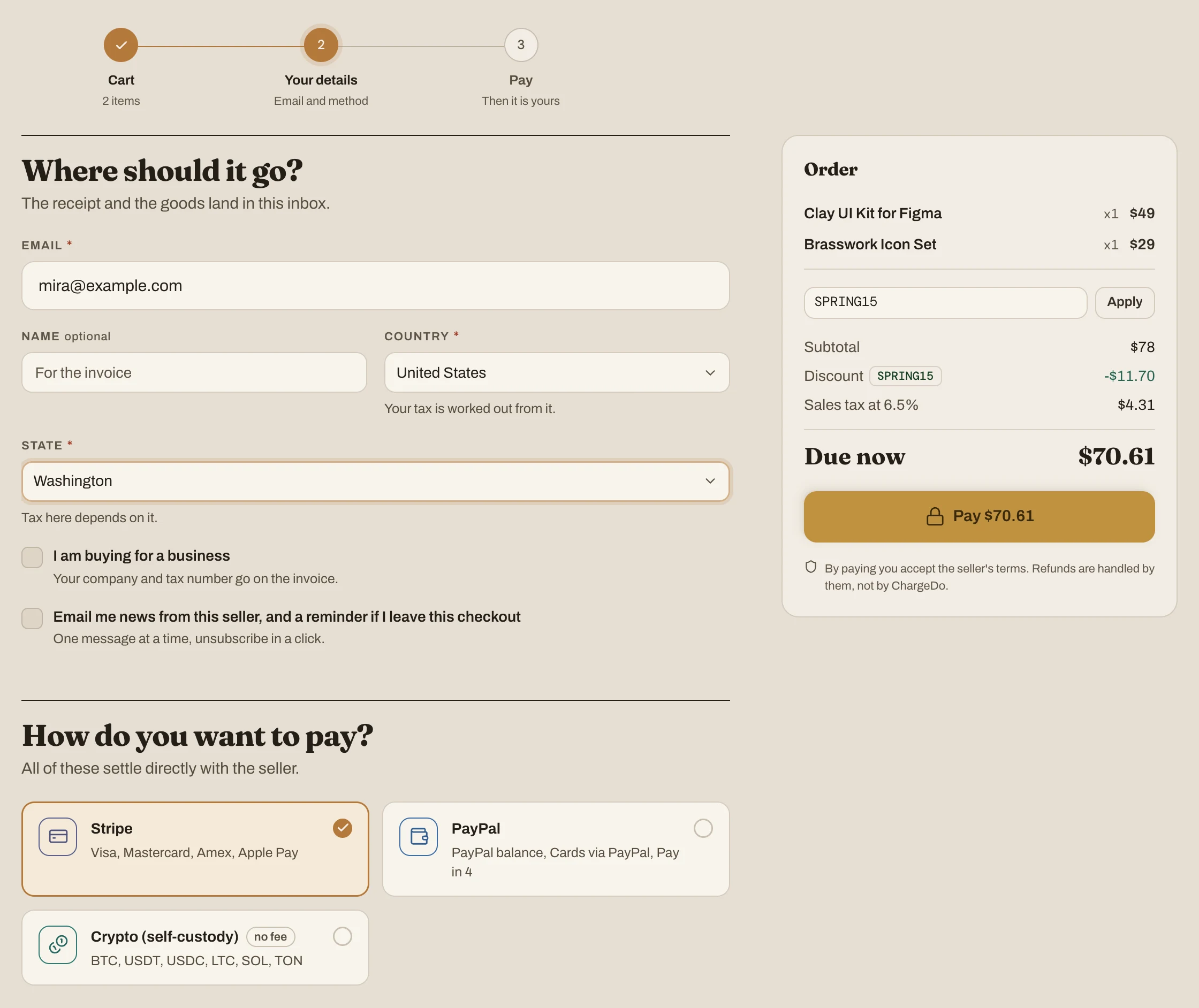
- Country is required, with the hint Your tax is worked out from it. Without it, checkout says Pick your country: your tax is worked out from it.
- Where you have a rate for a US state or a Canadian province, a buyer in that country is asked for theirs too: State, or Province or territory, Tax here depends on it. Without it: Pick your state: your tax is worked out from it.
- Until then, the order panel reads Tax Shown once you pick your country (or state).
- Tax added on top is a line before Due now, such as Sales tax at 6.5%, and Due now and the pay button include it.
- Tax inside the price is a line under Due now, such as Includes VAT at 19%: the price is what they pay.
- A business abroad with a tax number, under a reverse charge, sees VAT: reverse charge and pays the price without tax.
- A buyer somewhere you don’t charge tax pays the price, with no tax line.
How it is worked out
Each line of the cart is taxed at its product’s rate for the buyer’s place (each product’s rate). A discount on the whole order is shared across the lines first, in proportion to what each comes to, so each line is taxed on what was actually paid for it. Amounts are rounded to the currency’s smallest unit, such as the cent, line by line.
- Tax inside a price:
tax = price − price ÷ (1 + rate). - Tax added on top:
tax = price × rate, and the buyer pays the price plus it. - Under a reverse charge, a price that includes tax is charged without it, and one that doesn’t is charged as it is.
| Buyer | Price | Tax | Tax amount | They pay | Yours before fees |
|---|
| In Germany | €49.00 | 19% inside | €7.82 | €49.00 | €41.18 |
| In Germany, an e-book at the reduced rate | €12.00 | 7% inside | €0.79 | €12.00 | €11.21 |
| In Washington | $49.00 | 6.5% on top | $3.19 | $52.19 | $49.00 |
| A business in Germany | €49.00 | Reverse charge | €0.00 | €41.18 | €41.18 |
| In France, where no rate is set | €49.00 | None | €0.00 | €49.00 | €49.00 |
These are for a seller in the United Kingdom with rates for Germany (19%, 7% for e-books) and Washington (6.5%), and Prices and tax left at As local prices are shown.
Subscriptions
- The first payment is taxed like any sale. A free trial charges nothing, so it has no tax.
- Checkout says what each renewal charges the buyer, tax included, such as Renews at $9.59 a month with Sales tax for a $9 plan in Washington.
- A renewal you email a link for is taxed at your rate on the day it is issued.
- A renewal a card provider charges on its own, such as Stripe, charges the amount set when the buyer subscribed or last changed tier. Its tax is worked out from that amount, at the rate for the subscriber’s place. If you change a rate, renewals already set up at the provider keep their amount until the subscriber changes tier.
- The subscriber’s receipt email says when tax goes on top: “You are subscribed to Relay Pro (Solo), at $9.00 a month plus Sales tax.”
Where it is kept
- Each order keeps its tax as charged: the place, the tax name, whether it was inside the price or on top, a reverse charge, and each line’s rate, amount without tax and tax. Changing your rates changes new orders only.
- The order page and the buyer’s receipt show the tax line, and the receipt email gives it with the total.
- The invoice shows each line’s rate when they differ, a table of what each rate came to, and a note on how the tax was charged.
- The tax report adds it up by place, rate and month, and the orders export has it order by order.
- Through the API, an order, its lines and the checkout’s quote carry the tax as
tax (developer reference).