Help › Getting paid
Tax reports and downloads
What you charged and what you owe, by country, state, rate and month, as spreadsheets.
The Report tab of Tax adds up a period’s tax: what you charged, what you paid back, and what is left to report, by place and by rate. Its downloads are the figures your tax returns ask for, such as an EU One Stop Shop return, which reports each country’s sales at each rate.
Choosing a period
- Period
- This month, Last month, This quarter, Last quarter (where it opens), This year, Last year, or Dates of your own, from a First day to a Last day, up to 400 days.
- Country
- Every country, or one, with its states and provinces.
- Days start and end at midnight in your own time zone, under Settings, Profile: a quarter is the quarter as your calendar has it. The line under the choices says which period and time zone the figures are for.
- Only live sales count: test orders never do, and neither do free orders.
- A sale counts on the day it was paid. A refund, or a dispute you lost, counts on the day it happened, so a refund of last quarter’s sale lowers this quarter’s tax, as tax returns expect.
- Amounts are in your store’s currency: a sale in another currency is turned into it at the rate of the day it was paid, as Analytics does.

- To report
- The tax you charged, less the tax inside what you paid back: what the period adds to your returns.
- Tax charged
- All the tax on the period’s sales.
- Tax paid back
- The tax inside the period’s refunds and lost disputes. A part refund gives back that part of the tax.
- Sales without tax
- What the period’s sales came to, less their tax, with the number of orders, and what you sold to businesses under a reverse charge.
By country and state
The table lists every place you sold to in the period, with the most to report first: each with its tax name and rates, then Orders, Sales, Without tax, Tax charged, Paid back and To report. On a phone it shows the place and To report.
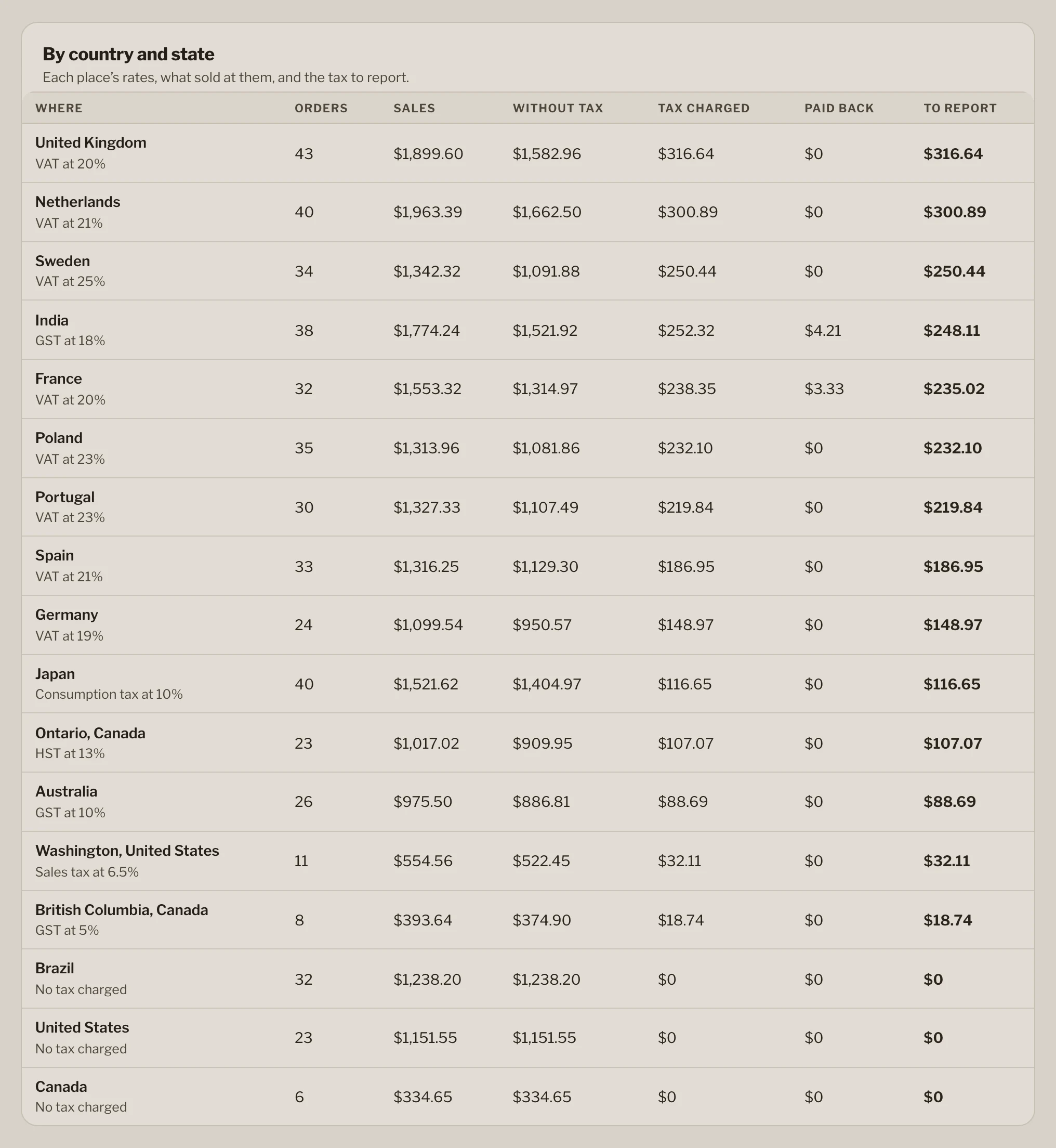
- A US state or Canadian province with its own rate is listed apart: Washington, United States. Sales in its country’s other states are under the country.
- With several rates at a place, such as a reduced rate for e-books, each is listed: VAT at 19% · 7%. The summary download has a row for each.
- Months: under the table, Tax to report, month by month charts each month of a period longer than one.
Where you sell without charging tax
A place where you sold but charge no tax is listed too, as No tax charged, and a note above the table names them: You sold to 3 places where you charge no tax: Brazil ($2,078.10), …. Many countries expect a seller to charge their tax once sales there pass a threshold: if you owe tax in one, add its rate.
Downloads
Download gives the period, and the country if you chose one, as a CSV file, which opens in any spreadsheet. Each file is named for what it holds, such as tax-summary-2026-07-01-to-2026-09-30-DE.csv.
- Summary by country and rate
- A row for each place and rate: what most tax returns ask for. Columns:
place, place_name, tax_name, kind, rate, currency, net_sales, tax, net_returned, tax_returned, tax_due. kind is taxed, zero rate, not taxed for a place without a rate, or reverse charge. - Every sale and refund
- A row for each sale, refund and lost dispute, in date order, with its order and invoice number, the buyer’s place and business details, and the amounts in the sale’s own currency and in your store’s. Amounts paid back are given as they are, not as negatives:
type says which it is. Columns: date, type, order, invoice, country, state_or_province, tax_place, tax_name, tax_rate, prices, reverse_charge, buyer_company, buyer_tax_id, currency, amount, net, tax, store_currency, amount_in_store_currency, net_in_store_currency, tax_in_store_currency. - Month by month
- A row for each month of the period. Columns:
month, currency, orders, sales, net_sales, tax, returned, tax_returned, tax_due, reverse_charged.
- Amounts are plain decimals, such as
40.83, and rates percentages, such as 20%, so a spreadsheet adds them up. - The figures in a file always match the page for the same period.
- Your accountant’s software can fetch the same report and files with an API key holding
tax:read (developer reference).
Who can see it
Everyone on your team can read the report and download it (What each role can do). Changing the rates is for the owner and admins (rates and rules).